Couldn't pass up the pre-purchase offer for Unity 3D 5. With that, not only do we get Unity 5 once released but we also get Unity 4.x Pro, plus the next couple of 4.x (4.5 and 4.6) releases.
Ready or not... here we come!
Showing posts with label 3D Engine. Show all posts
Showing posts with label 3D Engine. Show all posts
Wednesday, March 19, 2014

Wednesday, August 21, 2013
Status Update
A quick design / status update: Aug-21-2013
1. Turrets: We have plasma (straight-line ball of plasma) turrets and (lock-on) missile turrets working. Moving and tracking the target, which has given me even more ideas....
2. ROS (Reactive Organic Ships) - this race of organic beings (they ARE their ships) will transform their appearance (from GREEN (friendly) to RED (threatened)) depending on their mood.
I'll try and get a Unity Web app posted so you can see what I mean.
A million ideas riffle through my head while I hone and improve my C# and Unity 3D skills. I had to work through several problems while working on the turret systems since nearly all of the tutorials and forum posts were written in (yuk) javascript... :-p
Note: I have also had to abandon my (very nice) Apple magic mouse in favor of a (shivers) MS Home (USB) 3-button mouse which is absolutely a must (3-button) while using ANY 3D application, including Unity.
:-)
1. Turrets: We have plasma (straight-line ball of plasma) turrets and (lock-on) missile turrets working. Moving and tracking the target, which has given me even more ideas....
2. ROS (Reactive Organic Ships) - this race of organic beings (they ARE their ships) will transform their appearance (from GREEN (friendly) to RED (threatened)) depending on their mood.
I'll try and get a Unity Web app posted so you can see what I mean.
A million ideas riffle through my head while I hone and improve my C# and Unity 3D skills. I had to work through several problems while working on the turret systems since nearly all of the tutorials and forum posts were written in (yuk) javascript... :-p
Note: I have also had to abandon my (very nice) Apple magic mouse in favor of a (shivers) MS Home (USB) 3-button mouse which is absolutely a must (3-button) while using ANY 3D application, including Unity.
:-)
Thursday, January 24, 2013
Unity3D - Up and Running
We are headed down the Unity3D trail for Skyport Alpha and while we have not forgotten about our iOS roots, we'll be targeting a Mac and PC rollout first and then to iOS.
Nothing to show just yet, have spent the past several days watching and learning C# and Unity3D.
Nothing to show just yet, have spent the past several days watching and learning C# and Unity3D.
Thursday, January 10, 2013
Unity 3D
... is not out of the running, just yet.
Since indie devs know exactly what I mean by the "oh wouldn't that be cool" aka OWTBC where by even the most well planned development process can go awry, I've spent the last few days reviewing some (excellent) Unity 3D tutorials. I have a lot of concern but it makes a lot of sense to create, develop and manage the project in one (tool) place and Unity 3D offers exactly that.
... more to come ...
Since indie devs know exactly what I mean by the "oh wouldn't that be cool" aka OWTBC where by even the most well planned development process can go awry, I've spent the last few days reviewing some (excellent) Unity 3D tutorials. I have a lot of concern but it makes a lot of sense to create, develop and manage the project in one (tool) place and Unity 3D offers exactly that.
... more to come ...
Thursday, December 27, 2012
3D-ing it...
Learned a bunch about 3D "stuff" over the holiday break. Worked on a few test ships and space stations, nailed down the process which is like this:
Blender -> revise object name, export DAE -> PVRGeoPODGUI -> export POD -> PVRShaman -> revise/update material and save.
Sounds like a lot but it really isn't and the Isgl3dPODImporter works like magic, even importing children(1)(2)
Now that I see how easy it is to load and manage POD files it is time to work on tracking memory usage to determine a nominal setting.
I'm also adding to my development process several managers:
Isgl3dSceneManager <- to manage loading, transitioning and unloading (actually views)
SAShipManager <- I'll get this going pretty quick since it will make loading POD's super easy and fast. I'll use a plist to define not only 3d model properties like mesh name, scale and orientation / rotation but also base object (ship or other) properties like mass, crew, cargo, etc
Update: I'm monitoring in-app memory usage to learn about duplicating meshes and it looks pretty solid. Even though my iPad Simulator shows my memory at 82MB, on the actual iPad it's only 18, with like 8 objects including the space station, shield and background space sphere.
Obligatory screenshot (or it didn't happen!) ;-)
(1) Had one space station that was made up from 4 objects in Blender which I revised and made them children of the main_object.
(2) Update: I also tested the POD Exporter that you can install in Blender, and, well... I had mixed to poor results. While Blender did write out the POD file it also opened up the PVRGeoPODGUI app with the POD loaded. After this I ended up chasing my tail with scaling problems. I'll take some more time to document which process is more reliable.
Blender -> revise object name, export DAE -> PVRGeoPODGUI -> export POD -> PVRShaman -> revise/update material and save.
Sounds like a lot but it really isn't and the Isgl3dPODImporter works like magic, even importing children(1)(2)
Now that I see how easy it is to load and manage POD files it is time to work on tracking memory usage to determine a nominal setting.
I'm also adding to my development process several managers:
Isgl3dSceneManager <- to manage loading, transitioning and unloading (actually views)
SAShipManager <- I'll get this going pretty quick since it will make loading POD's super easy and fast. I'll use a plist to define not only 3d model properties like mesh name, scale and orientation / rotation but also base object (ship or other) properties like mass, crew, cargo, etc
Update: I'm monitoring in-app memory usage to learn about duplicating meshes and it looks pretty solid. Even though my iPad Simulator shows my memory at 82MB, on the actual iPad it's only 18, with like 8 objects including the space station, shield and background space sphere.
Obligatory screenshot (or it didn't happen!) ;-)
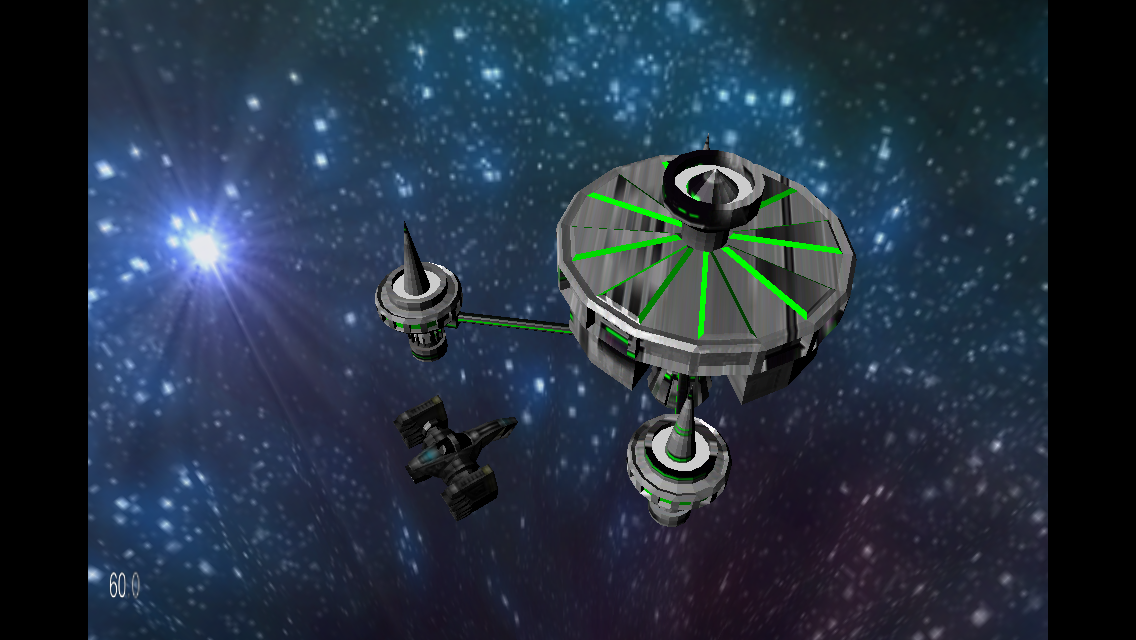
(1) Had one space station that was made up from 4 objects in Blender which I revised and made them children of the main_object.
(2) Update: I also tested the POD Exporter that you can install in Blender, and, well... I had mixed to poor results. While Blender did write out the POD file it also opened up the PVRGeoPODGUI app with the POD loaded. After this I ended up chasing my tail with scaling problems. I'll take some more time to document which process is more reliable.
Friday, December 21, 2012
Design: 2D vs 3D
One early decision we made was to go with a 3D game design. It ultimately won because one of our main objectives will be Explore and let's face it, flying around in a 2D game isn't very Engaging.
With 3D selected, the next choice is game engine. While there is a cocos3d that leverages the awesome cocos2d framework, I disqualified it due to some of its limitations. Surprisingly there are quite a few to chose from:
With 3D selected, the next choice is game engine. While there is a cocos3d that leverages the awesome cocos2d framework, I disqualified it due to some of its limitations. Surprisingly there are quite a few to chose from:
- Unity (free & $1500)
- Sio2 Interactive (-annual fee, yuk)
- Ogre
- Panda3D (not iOS?)
- iSGL3D (open source and awesome) <- winner!
Subscribe to:
Posts (Atom)